Bass Win Official Account Login — Secure Sign-In and Password Recovery

Access your Bass Win Casino account to check your balance, continue slot sessions, place sports bets and review your transaction history. Entry is available through the main site and the mobile app — the process is the same on desktop and phone, and takes under a minute if your credentials are ready.

Welcome: up to £250 first deposit plus 60 free spins in one package
Registerwith bonus

Where to find the login form

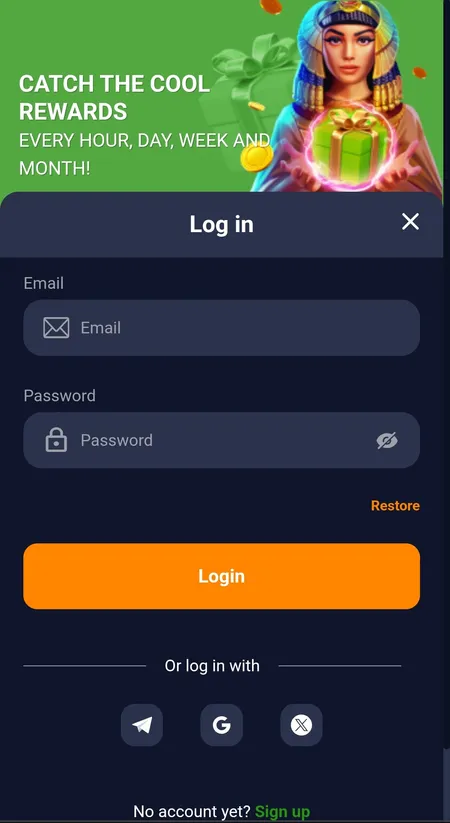
On the desktop version of the site the Login button sits in the top-right corner of the header. On mobile the same button appears in the top navigation bar. Tap or click it and a modal window slides in with Email and Password fields — no separate login page to navigate to.

In the Android APK and the iOS PWA (Add to Home Screen), the entry point is the same modal. If you installed the app and open it fresh, you land on the home screen with the Login button front and centre.

Bass Win login modal with email and password fields

The login modal shows Email, Password, a Restore link and social login options: Telegram, Google and X (Twitter).

What you enter to sign in

Bass Win uses your registered email address as the identifier. Enter the email you used at sign-up, then your password. There is also a Restore link directly below the password field for recovery.

Social login is available as an alternative: connect via Telegram, Google or X (Twitter) — whichever you linked at registration. No separate password needed if you use that route.

Step-by-step: how to log in

Below is the full flow in one place, covering both browser and app entry.

Signing in to Bass Win

  1. Open the Bass Win site or launch the app. Tap Login in the header.

  2. Enter your email address in the first field and your password in the second.

  3. If a verification code is requested (security check), enter the code sent to your email or phone.

  4. Press Login. You are redirected to the lobby with your balance visible in the top strip.

  5. Browser vs app difference: in the browser you may be asked to complete a CAPTCHA on suspicious networks; in the app the session is usually remembered between launches unless you manually log out or clear app data.

Forgot your bass win login password

Click Restore on the login modal. Enter the email address tied to your account and follow the reset link sent to your inbox. The link has a limited validity window, so use it promptly.

No email arriving? Check your spam or promotions folder first. If the address field shows a different email than the one you registered with, the reset will not reach you — try alternative addresses you may have used. If nothing works, contact Bass Win support through the official site's Contacts page; they can verify your identity and assist with account recovery.

New password requirements: choose something you have not used on this account before; avoid simple sequences. Once reset, your old password becomes invalid immediately.

Why the site might not let you in — quick checklist

Most login failures come down to one of these:

  • Wrong email — you may have registered with a different address; try variations.
  • Caps Lock or keyboard layout — passwords are case-sensitive.
  • Outdated saved password — browser autofill can store an old version after a reset.
  • CAPTCHA — complete the visual challenge if it appears; switching from a VPN or public Wi-Fi often triggers it.
  • VPN or regional block — if Bass Win detects a restricted jurisdiction, the session may be refused. Try disabling the VPN or switching server location.
  • App out of date — update the Android APK or re-add the iOS PWA to clear cached data.
  • Account restriction — if you see a message about a blocked or limited account, do not attempt multiple logins; contact official support to find out the reason.

Clearing browser cookies or reinstalling the app resolves the majority of unexplained issues.

If your browser remembers the session, you stay logged in across visits. On a shared or public device, always use the manual logout option to protect your account.

Two-factor authentication

If you have enabled 2FA on your account, you will be prompted for a time-based code after entering your password. Have your authenticator app ready. If you no longer have access to the authenticator (lost phone, reinstalled app), use the backup codes you saved at setup. If those are also gone, reach out to Bass Win's official support team — identity verification will be required before access is restored.

Session length and account security

Bass Win keeps you logged in for a reasonable session period; the exact duration depends on activity. For safety:

  • Always log out after a session on a shared computer — use the account menu to sign out.
  • Avoid completing the login bass win password step over public Wi-Fi without a trusted network.
  • Never share your one-time codes or password with third parties; the platform will not ask for them via chat.

If you suspect your credentials have been compromised, reset your password immediately and contact support.

What happens right after you log in

Some accounts are prompted to confirm their email address or phone number on first entry, or to complete profile details (name, date of birth, address). This is standard KYC practice — the platform needs to verify identity before enabling withdrawals above certain thresholds. Upload documents in the Profile → DOCUMENTS section when prompted. Delaying verification can hold up withdrawal requests, so it is worth completing early.

For a full overview of the platform, visit the Bass Win Casino home page. Ready to make your first deposit? Check the available options on the Bass Win payments page.
Go to Bass Win

FAQ

I entered the correct password but it says it is wrong — what should I do?

Double-check Caps Lock and keyboard layout. If you recently reset your password, make sure you are using the new one — the old password is deactivated immediately. If the problem persists, use the Restore link to set a new password.

The reset email is not arriving — what now?

Check your spam, junk and promotions folders. Confirm you are entering the exact email used at registration. Wait a few minutes and request again. If still nothing, contact Bass Win official support with your registered details so they can identify the account.

The login form is not loading or keeps spinning — what can I do?

Try a different browser or clear cookies and cache. Disable browser extensions that might block scripts. On mobile, force-close the app and reopen it, or switch between Wi-Fi and mobile data.

Login works in the browser but not in the app — or vice versa?

Update the Android APK to the latest version or re-add the iOS PWA (Add to Home Screen). If the app session is stuck, clear app data in your phone settings and log in again.

I do not remember which email I registered with — can I recover the account?

Try every email address you commonly use. If none work, reach out to Bass Win support via the official Contacts page. They can locate the account using your phone number, full name or other registered details.

My account is showing as blocked or restricted — where do I report this?

Do not attempt repeated logins, as this can extend the block. Contact Bass Win's official support team directly. They will explain the reason (identity check, bonus conduct review, etc.) and guide you through the resolution steps.