Bass Win Official App — Download for Android APK and iOS, Play Anywhere

The Bass Win mobile app brings the full casino and sportsbook to your phone — slots, live dealer tables, sports betting and esports in one place. On Android you install a native APK; on iOS you add a PWA shortcut to your home screen. Both options are free, take under two minutes, and give you the same account, bonuses and payment methods as the desktop site.

Welcome: up to £250 first deposit plus 60 free spins in one package
Registerwith bonus

Why use the app instead of the browser

The mobile app loads faster than a browser tab because it skips the usual page-rendering overhead. Navigation is built around a bottom bar — Games, Live Casino, Sport, Search — so switching between slots and live betting takes one tap. Push notifications alert you to tournament countdowns and lottery qualification windows without needing to check the site manually. All the same payment rails (Visa, Apple Pay, bank transfer, crypto) and withdrawal history are available directly inside the cashier tab.

App install bonus

Installing the Bass Win app and making a deposit unlocks a tiered gift:

Deposit amount Bonus
From £1 £5
From £51 £10
From £101 £15
From £251 £20
From £501 £30
From £1,001 or more £50

The bonus is awarded once per account. It applies if you deposited at least £1 before installing, or make your first deposit within 72 hours after installation. The maximum gift is £50.

How to download the Bass Win APK for Android

The APK is distributed directly from the Bass Win operator site — not via Google Play. You can reach the download page from the app section of the main site or by scanning the QR code shown there (the QR links to basswin07.com, an alternate download mirror operated by the same group).

Steps to install on Android:

  1. Open the app page on the Bass Win site in your mobile browser.
  2. Tap Download and wait for the APK file to save.
  3. Open the file from your notifications or Downloads folder.
  4. If prompted, allow installation from unknown sources in your device settings (Settings → Security → Install unknown apps for your browser).
  5. Tap Install and wait a few seconds.
  6. Open Bass Win from your home screen or app drawer.

If the install is blocked, check that you are allowing the specific browser you used to download the file — Android restricts this permission per-app since Android 8.

iOS installation: PWA to home screen

Bass Win is not listed on the Apple App Store. Instead, the operator provides a PWA (Progressive Web App) that behaves like a native app once pinned.

  1. Open the Bass Win site in Safari (not Chrome — only Safari supports Add to Home Screen reliably on iOS).
  2. Tap the Share icon at the bottom of the screen.
  3. Select Add to Home Screen.
  4. Confirm the name and tap Add.
  5. The Bass Win icon appears on your home screen; tap it to open the app-style interface.

The PWA uses the same session as your browser, so if you are already logged in you stay logged in.

Compatibility and system requirements

Parameter Android iOS
Minimum OS Android 7.0 iOS 14
Storage needed ~40 MB (APK) No install — browser cache
Internet 3G minimum, Wi-Fi recommended for live casino Same
App Store required No No

Most Android devices from 2017 onward and iPhones from iPhone 6s running iOS 14 are compatible.

Registration and account setup

You can register directly inside the app — the sign-up form asks for email and password, and requires confirming you are 18 or older. Social login via Telegram, Google or X (Twitter) is also available. After the first login, the profile step asks for name, date of birth, country and address. For full KYC details and a step-by-step walkthrough, see the registration page.

Logging in and managing your account

The login screen accepts email and password. If you forget your password, tap Restore and follow the email link. Inside the profile tab you can change your password, upload KYC documents (identity, address, payment method), and track verification status. Document uploads support .jpg, .jpeg, .bmp, .png and .pdf — up to 15 MB per file. Personal data such as name or phone number cannot be changed self-serve; contact support to update those fields.

Deposits and withdrawals in the app

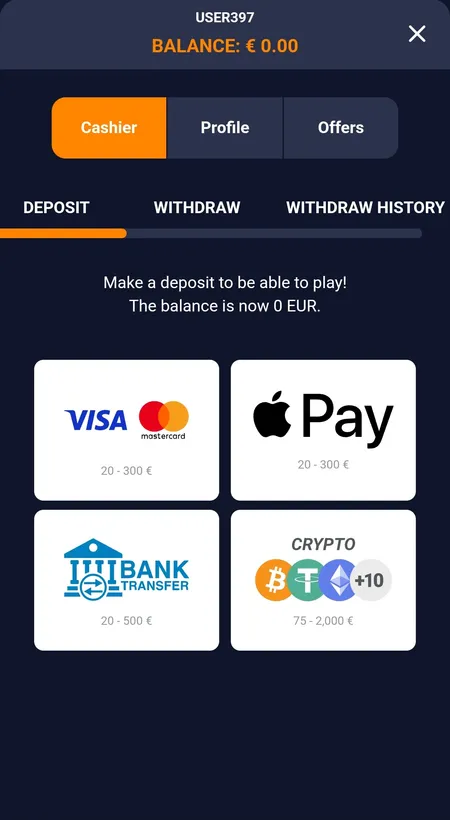
The cashier tab shows all available payment methods with their limits:

Method Deposit Withdrawal
Visa / Mastercard £20–£300 £100–£400
Apple Pay £20–£300 —
Bank transfer £20–£500 —
Crypto (BTC, ETH, USDT +10) £75–£2,000 —

Note: the minimum deposit per transaction can be as low as £20 via Visa or Apple Pay, but activating the welcome offer cards requires a higher minimum (£25, £50 or £75 depending on the offer). Method minimums and bonus eligibility minimums are separate conditions.

Bass Win cashier deposit screen with payment methods

Cashier deposit tab showing Visa, Apple Pay, bank transfer and crypto options with their respective limits.

Mobile bonuses and VIP programme

The app gives access to every promotion running on the platform. The weekly 7-Day Battle tournament (£15,000 prize pool, ranked by total slot bet volume), the Weekly Lottery (£27,500 prize pool, lottery tickets earned from deposits of £50 or more), and the 5% weekly cashback (requires deposits over £100) are all accessible from the Offers tab.

The VIP loyalty programme has five tiers — Pond Explorer, River Raider, Lake Conqueror, Ocean Commander, Deep Sea Legend — each unlocking higher cashback rates, more free spins on Tuesdays, and exclusive bonus offers. Points are earned through Endless Missions, tournaments and lotteries. Tier status requires a deposit within the last 60 days to receive regular rewards.

Sports and casino inside the app

The Sport section covers football, tennis, basketball, ice hockey, cricket, MMA, boxing, golf and more, with live event counts visible in the lobby. Cybersport filters include Dota 2, League of Legends, Valorant and CS:GO. For full details on live odds and bet types, visit the betting page.

The casino lobby covers Slots, Live Casino (roulette, blackjack, baccarat, poker), Bonus Buy, Hold and Win, Crash games, Table Games and Virtual Sport. Providers in the filter include Booongo, BGaming, PG Soft, Yggdrasil, Endorphina, Spribe and many others.

Updating the app

Android APK updates are not automatic — when a new version is released, download the updated APK from the same page on the operator site and install it over the existing version without uninstalling first. Your account data and settings are preserved. The iOS PWA updates automatically when you open it, since it fetches the latest version from the server each time.

Security

The platform uses encrypted connections for all account and transaction data. Sessions can be monitored in the profile settings. KYC verification — identity document, address proof and payment method confirmation — is required before large withdrawals (above USD 1,000 equivalent) and is processed in the Documents section of the profile. Protecting your password and using a unique email for the account reduces risk of unauthorised access.

FAQ

Where do I get the Bass Win APK for Android?

From the app page on the official Bass Win site. Tap Download, allow installation from unknown sources in your Android settings, then open and install the file. Alternatively scan the QR code on the app page.

Is Bass Win available on the App Store or Google Play?

No. Android uses a direct APK download; iOS uses a PWA added to your home screen via Safari Share → Add to Home Screen.

The APK will not install — what should I check?

Make sure you have enabled installation from unknown sources for the browser you used to download the file. On Android 8 and above this permission is set per-app in Settings → Security → Install unknown apps.

Does the iOS PWA work in Chrome?

Add to Home Screen on iOS requires Safari. Open the site in Safari, tap Share, then Add to Home Screen.

Do I get a bonus for installing the app?

Yes. After installing and making a qualifying deposit you receive a tiered gift from £5 (deposit from £1) up to £50 (deposit from £1,001). The bonus is awarded once per account and the deposit must be made before install or within 72 hours after.

Are the deposit limits the same in the app as on the desktop site?

Yes. Visa and Apple Pay accept £20–£300 per deposit; crypto accepts £75–£2,000. Bonus activation may require a higher minimum deposit than the payment method floor — check the active offer card for the exact figure.

How do I update the Android app?

Download the latest APK from the operator site and install it over the current version. No need to uninstall first. The iOS PWA updates automatically on each launch.

Can I bet on sports and play casino games in the same app?

Yes. The bottom navigation bar switches between Games, Live Casino, Sport and Search within the same session.

Download the Bass Win app and get up to £50 as an install bonus — plus access to the full casino and sportsbook from your phone.